Manage cookies that are used for advertising, such as ad personalization, remarketing, and ad effectiveness analysis.
8.3.16. Configure SSL for PostgreSQL
When a certificate is installed or removed, the instance is restarted.
TLS/SSL encryption is used to secure data transmitted between the client and the server. Follow these instructions to configure encryption using your own SSL certificate with hostname validation.
Use the console on your device to run the commands. This will create certificate and key files. The server certificate files are installed on the hosting server; the client certificate files are used when configuring the client; and the CA certificate is used to verify the authenticity of the server and client certificates.
- Create a CA (Certificate Authority) certificate that will be used to sign and verify the server and client certificates:
openssl req -new -x509 -newkey rsa:4096 -nodes -sha256 -days 3650 \ -keyout ca-key.pem \ -out ca-cert.pem \ -subj "/CN=PostgreSQL_CA" \ -addext "basicConstraints=critical,CA:true,pathlen:0" \ -addext "keyUsage=critical,keyCertSign,cRLSign" - Create a server certificate (in the commands, replace ‘'example.psql.tools’' with your instance's host address):
- Create a key and CSR:
openssl req -new -newkey rsa:2048 -nodes -sha256 \ -keyout server-key.pem \ -out server-req.pem \ -subj "/CN=example.psql.tools" - Sign the certificate:
openssl x509 -req -sha256 -days 365 \
  -in server-req.pem \
  -CA ca-cert.pem \
  -CAkey ca-key.pem \
  -CAcreateserial \
  -out server-cert.pem \
  -extfile <(printf "basicConstraints=critical,CA:FALSE\nkeyUsage=critical,digitalSignature,keyEncipherment\nextendedKeyUsage=serverAuth\nsubjectAltName=DNS:example.psql.tools")
- Create a client certificate:
- Create a key and CSR:
openssl req -new -newkey rsa:2048 -nodes -sha256 \ -keyout client-key.pem \ -out client-req.pem \ -subj "/CN=postgresql-client" - Sign the certificate:
openssl x509 -req -sha256 -days 365 \
  -in client-req.pem \
  -CA ca-cert.pem \
  -CAkey ca-key.pem \
  -CAserial ca-cert.srl \
  -out client-cert.pem \
  -extfile <(printf "basicConstraints=critical,CA:FALSE\nkeyUsage=critical,digitalSignature,keyEncipherment\nextendedKeyUsage=clientAuth")
- Install the server certificate, its key, and the CA certificate in the "PostgreSQL" section on the "Settings → SSL" tab (leave the private key password field blank if you did not specify a password when creating the certificate):
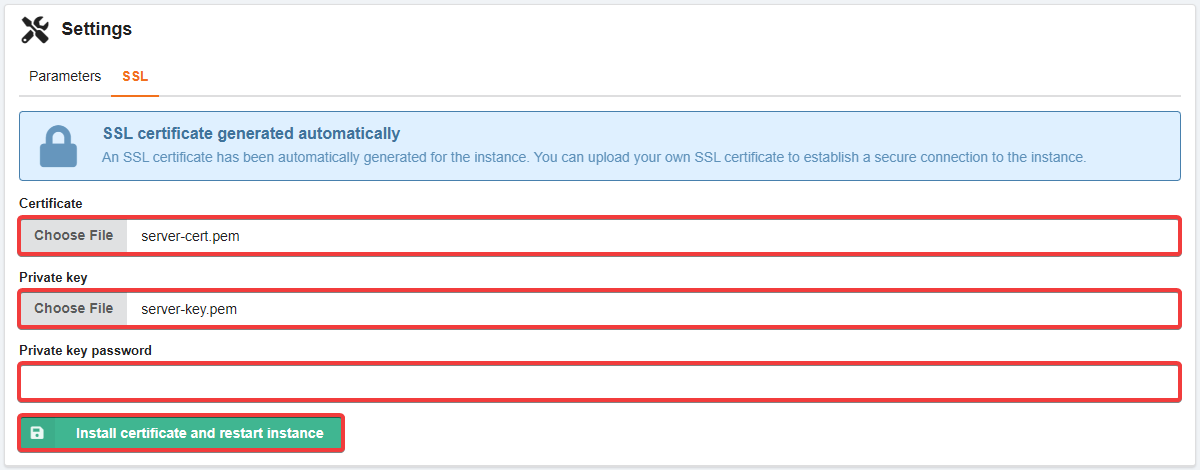
- Check the host address in the installed certificate (use your connection credentials in the command:
example.psql.tools— host,12345— port):openssl s_client -connect example.psql.tools:12345 -starttls postgres -showcerts </dev/null 2>/dev/null | openssl x509 -noout -subject -issuer -ext subjectAltNameWithout a certificate installed, the output looks like this:
subject -issuer -ext subjectAltName
subject=CN = adm.tools
issuer=CN = adm.tools
No extensions in certificate
After installing the certificate, the output will show the host address of your instance:
subject=CN = example.psql.tools issuer=CN = example.psql.tools X509v3 Subject Alternative Name: DNS:example.psql.tools - Connect to the instance using a client certificate and make sure the connection is encrypted (use your connection credentials in the command:
example.psql.tools— host,12345— port,db1— database,user1— user):psql "host=example.psql.tools port=12345 dbname=db1 user=user1 sslmode=verify-full sslrootcert=ca-cert.pem sslcert=client-cert.pem sslkey=client-key.pem"Execute the SQL query:
SELECT ssl, version, cipher, bits, client_dn FROM pg_stat_ssl WHERE pid = pg_backend_pid();If everything is configured correctly, the connection is established successfully, and the output looks like this:
 ssl | version |         cipher         | bits |       client_dn
-----+---------+------------------------+------+-----------------------
 t   | TLSv1.3 | TLS_AES_256_GCM_SHA384 |  256 | /CN=postgresql-client